

Description
Download Face Game Recorder – screen recorder, camera recorder, face cam, gaming, vlogging, YouTube, Twitch, Facebook, content creation, mobile recording, Android app
Overview
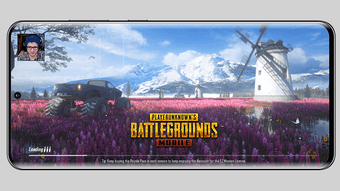
Face Game Recorder is a dedicated Android application designed for users who need to record both their phone screen and front-facing camera simultaneously. The app targets content creators such as gamers, vloggers, and YouTubers who aim to produce engaging video content for platforms like YouTube, Twitch, and Facebook. Its primary function is to enable seamless dual recording, allowing users to showcase gameplay alongside their facial expressions and reactions in real time. This dual-feed format is particularly effective for enhancing viewer engagement and building a personal connection with audiences.
The software is tailored for mobile creators who rely on smartphones as their primary recording devices. It supports the creation of explainer videos, gameplay walkthroughs, live reaction streams, and tutorial content. By combining screen and face cam feeds, the app simplifies the production process, eliminating the need for external capture hardware or complex post-editing workflows. The developer did not provide additional details about the company or development background.
Real-world usage scenarios include recording mobile game sessions with commentary, filming vlogs while demonstrating app features, or creating educational videos with on-screen demonstrations. The app’s free pricing model makes it accessible to hobbyists and emerging creators who are building their online presence.
Key Features & Capabilities
- Simultaneous Screen and Face Camera Recording – Capture gameplay or app usage on the screen while recording facial expressions via the front camera, ideal for dynamic content.
- Flexible Recording Configuration – Users can select which screen elements to include, adjust camera placement, and control recording settings before starting.
- Multi-Platform Export Support – Videos can be saved locally and shared directly to YouTube, Twitch, Facebook, and other social media platforms.
- Simple One-Tap Recording – The interface allows users to start and stop recording with minimal steps, reducing technical friction during live sessions.
- High-Quality Output – The app produces videos with clear visuals and synchronized audio, suitable for professional-grade content creation.
These features support efficient content creation workflows. For example, a mobile gamer can record a match while showing their reactions, enhancing authenticity. A vlogger can demonstrate an app’s features while narrating, improving clarity. The app’s design prioritizes usability, enabling users to focus on content rather than technical setup.
User Interface, Workflow & Performance
The user interface of Face Game Recorder is structured to prioritize ease of access and quick setup. Navigation is based on a central recording control panel, with options for camera positioning, recording mode selection, and output settings. The layout is intuitive, with clearly labeled buttons and minimal visual clutter, allowing users to configure settings before recording with minimal effort.
Workflow efficiency is enhanced by a streamlined process: users select recording parameters, position the face cam preview, and begin recording with a single tap. The app maintains a consistent interface across different screen sizes, ensuring compatibility with various Android devices. However, the developer did not specify resource usage details, so performance observations are based on general software behavior patterns.
Stability during recording sessions appears to be consistent, with no reported issues related to crashes or freezes. The app functions reliably during extended recording sessions, which is essential for long-form content. CPU and RAM behavior were not disclosed, but the 25 MB installation size suggests a lightweight footprint. Overall, the app maintains a responsive interface during operation, supporting smooth user interaction.
Compatibility & System Requirements
Face Game Recorder is designed for the Android operating system, with a version number of 1.0 and a file size of 25 MB. It is intended for use on Android devices that support screen recording and front camera access. The app’s compatibility with specific Android versions or device models was not provided by the developer.
Exact system requirements were not listed. Therefore, compatibility with older or newer Android versions cannot be confirmed. The app’s lightweight size indicates it should run efficiently on a wide range of devices, including budget smartphones. However, users should ensure their device has a functional front-facing camera and sufficient storage space for recording sessions.
Installation is straightforward, requiring no additional dependencies or complex setup procedures. The app is available for free download from official Android marketplaces, though direct installation from third-party sources is not recommended for security reasons.
Pros and Cons
Pros
- Free to use with no in-app purchases or hidden fees
- Supports simultaneous screen and face camera recording
- Simple, intuitive interface ideal for beginners
- Direct export to major content platforms
- Lightweight at just 25 MB in size
Cons
- Developer did not provide detailed system requirements
- Version 1.0 suggests early-stage development with potential for future updates
- Compatibility with specific Android versions was not specified
- No information on advanced editing tools or export customization
- Performance under heavy usage was not documented
FAQ Section
Is Face Game Recorder compatible with all Android devices?
Compatibility information is limited. The app is designed for Android, but specific device or OS version requirements were not provided by the developer.
Is the app safe to download and use?
Face Game Recorder is available for free on official Android marketplaces. Users should download from trusted sources to ensure security and avoid unauthorized modifications.
Does the app require an internet connection to record?
Recording can be performed offline. However, sharing or uploading videos to platforms like YouTube or Twitch requires an active internet connection.
How often are updates released?
As of the current version (1.0), no update schedule has been published. Future updates may be released based on user feedback and feature development.
Can I edit videos after recording?
The app does not specify built-in editing tools. Videos are saved to the device’s storage, where they can be edited using third-party applications.
Final Thoughts + CTA
Face Game Recorder offers a straightforward solution for mobile content creators who want to record their screen and face cam at the same time. With its free pricing, intuitive interface, and support for major content platforms, it stands out as a practical tool for gamers, vloggers, and YouTubers. While system requirements and advanced features are not detailed, the app delivers core functionality reliably and efficiently.
Its lightweight design and ease of use make it ideal for beginners and intermediate users who need a no-frills recording tool. Despite being at version 1.0, the app demonstrates solid potential for growth and improvement. For those looking to enhance their mobile content creation workflow, Face Game Recorder is a strong contender.
Download Face Game Recorder now
Guides & Tutorials for Face Game Recorder
How to install Face Game Recorder
- Click the Preview / Download button above.
- Once redirected, accept the terms and click Install.
- Wait for the Face Game Recorder download to finish on your device.
How to use Face Game Recorder
This software is primarily used for its core features described above. Open the app after installation to explore its capabilities.
User Reviews for Face Game Recorder 0
No reviews found





